

Microsoft 365, boasting around 345 million paid seats, is a leading cloud platform globally. Its popularity continues to grow, with a 32% increase in Q3 2022 compared to the previous year.
One of the factors contributing to its widespread adoption is the diverse suite of over 20 cloud tools offered within the service, including the renowned MS Office suite.
However, with such a wide range of apps, it’s common for some to go overlooked or unused by companies who may not even be aware of their availability. One such gem is Microsoft Forms, a powerful online survey and form-building tool that offers numerous benefits to organizations.
From conducting year-end customer surveys to assessing change readiness, Forms simplifies the process. The best part? If you already have a subscription to Microsoft 365, you have free access to Forms as part of your subscription.
What Is Microsoft Forms?
Microsoft Forms is a user-friendly form, quiz, and survey creator that lets you easily design forms with its drag-and-drop interface. You can share your surveys via a link, and recipients can conveniently fill them out online from any device.
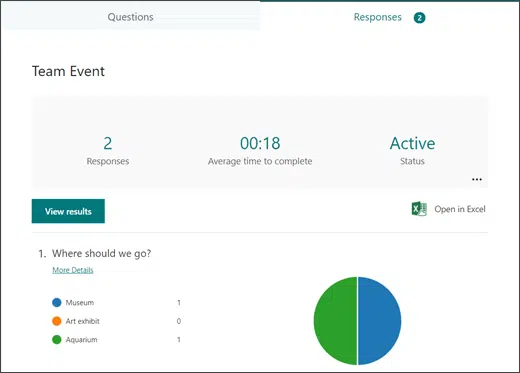
As soon as respondents complete the survey, the results are instantly captured in the software. You can view the consolidated results presented in charts within the software itself, and even export them to Excel for further analysis.
How to get started with Microsoft Forms
1.Visit Forms.office.com and log into your Microsoft account.
2.Choose “New Form” or “New Quiz: from the top menu
- OR you can choose to explore the built-in templates

- Click “Add New” to add a new form field. You can choose from field types:
- Choice (i.e., multiple-choice question)
- Text
- Rating
- Date
- Ranking
- Likert (a scale that records attitudes/opinions about a topic)
- Net Promoter Score® (a scale from “not likely” to “extremely likely”)
- Section (separator that can include a title and image)
- Enter your questions.
- Once finished, click “Send” at the top. You can distribute the survey using the following options:
- Link to a web form
- QR code
- Embed in a web page
- Via Facebook or Twitter
- View responses on the “Responses” tab
Advantages of Using Microsoft Forms
Microsoft 365 subscribers have access to Forms, which can save money compared to using separate survey tools like Survey Monkey. You can easily access Forms by signing in with your Microsoft account.
Sending surveys by email can be time-consuming and cumbersome. With MS Forms, there’s no need for email attachments or worry about bounced emails. People can simply follow your link and fill out the form online, saving you time. Forms also automatically collates all the answers for you.
Forms provides meaningful graphs for survey results, making it easy to visualize the data. You can also export the results to Excel for use in other platforms. On the “Responses” tab, you can hover over the result graphs to see the details.
User-Friendly Interface
Microsoft Forms has a simple and intuitive interface, making it easy for anyone to start using it with minimal learning curve.
Increase Your Customer Response Rate by Using a Web-based Survey with Microsoft Forms.
Customers can easily fill out the satisfaction survey from any device, providing quick and convenient feedback. Instant results and charts provide insights for business improvement.
Employee Security Awareness Quiz
Integrate a security awareness quiz into your cybersecurity training with Microsoft Forms. Easily track response times per person to assess employee readiness.
Change Readiness Survey
Use Microsoft Forms to improve change management in your organization. Send out change readiness surveys to affected groups to assess user readiness for technology-driven transitions.
Event Registrations
Effortlessly gather event registration details with Microsoft Forms. Share the Forms link via QR code, social media, text, or email for easy registrations.
Volunteer Registration Form
Embed an MS Forms registration form on your website to streamline volunteer sign-ups. Forms automatically collate volunteer information, helping you match talents to your needs more effectively.
And More
Explore the Forms templates for more ideas, such as competitive analysis studies, post-event feedback surveys, office facility request forms, employee satisfaction surveys, product pricing surveys, food catering request forms, save-the-date forms, and course enrollment forms.
Would you Like to Get More out of Microsoft 365?
It’s possible that your company may not be fully leveraging the value of Microsoft 365. Contact us today to discover more about our comprehensive support services for Microsoft 365.