


As technology continuously advances, the realm of design tools follows suit. Microsoft has been a pioneer in business applications. Commencing with around seven apps, Microsoft 365 now extends access to over 20 for new users.
Among the recent additions is Microsoft Designer, a user-friendly design tool that has captured the interest of both designers and professionals. Whether you possess expertise in graphics, engage in marketing, own a small business, or simply seek to create amusing memes, Microsoft Designer caters to your needs.
It presents an array of features to streamline your design workflow. If you haven’t experienced it yet, it’s worth exploring. With its AI capabilities and intuitive interface, it has the potential to elevate your design prowess, in addition to economising time and expenses for crafting business graphics. Let’s delve into its key attributes.
Intuitive and User-Friendly Interface
Presenting an intuitive and easily navigable interface, Microsoft Designer caters to individuals of all skill levels, from novices to seasoned designers. The tool offers a well-structured and orderly workspace, fostering an environment of undistracted design concentration. Its user-friendly functionalities encompass:
- Drag-and-drop functionality
- Contextual menus
- Easy navigation
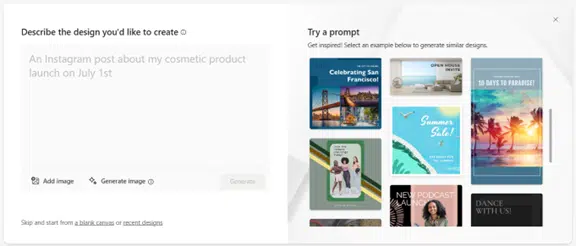
- Text prompts to start your design
The first prompt it asks is “Describe the design you’d like to create.” This makes it simple for someone with no design experience to use it. Based on your prompt, the system can leverage AI to generate graphics. You can also upload your own.
Comprehensive Design Templates and Assets
Microsoft Designer stands out due to its array of noteworthy attributes. Among these is its comprehensive compilation of templates and resources. Within this collection are a diverse array of professionally designed templates, enabling you to promptly initiate your design ventures.
Whether you require a business card, flyer, or social media post, this application offers a versatile selection. Furthermore, the tool encompasses an extensive reservoir of assets, encompassing:
- High-quality images
- Icons
- Fonts
- Color palettes
Employ these resources to craft visually captivating designs that resonate with your brand persona. The wealth of design assets bestows upon you creative autonomy and adaptability, allowing you to joyfully manifest your imaginative vision.
Smart Layout Suggestions and Design Recommendations
Microsoft Designer transcends being a conventional design tool; it evolves into an insightful design collaborator. Powered by artificial intelligence, this tool adeptly scrutinizes your design and furnishes intelligent layout suggestions and counsel. This functionality is invaluable, even if designing visuals isn’t your forte, enabling you to craft respectable results.
The AI assistance proves particularly beneficial for those new to design or seeking creative inspiration. Serving as your “design assistant,” it delivers ideal font combinations, suitable image placements, and more. By aiding you in making well-informed design decisions, Microsoft Designer heightens the visual resonance of your creations while liberating you from investing excessive hours in a single design endeavour.
Seamless Collaboration and Integration
In the modern digital work environment, collaboration stands as a pivotal requirement, a need that Microsoft Designer comprehends and addresses effectively. The tool presents effortless collaborative functionalities, enabling multiple users to engage concurrently in the same design undertaking. It facilitates effortless sharing of your designs with colleagues or clients, allowing for immediate feedback and edits.
Additionally, Microsoft Designer harmoniously integrates with various other Microsoft Office applications, including PowerPoint and Word. This integration fosters a coherent workflow spanning diverse design and documentation responsibilities. The capacity to collaborate ensures streamlined teamwork, while the seamless integration with complementary tools amplifies overall productivity.
Accessibility and Cross-Platform Support
Microsoft Designer acknowledges the significance of inclusivity and cross-platform adaptability. The application is accessible through both a web interface and a desktop version, accommodating usage on both Windows and Mac systems. It caters to various work scenarios, whether you’re operating from a desktop computer or a mobile device.
Furthermore, the tool aligns with established accessibility criteria, ensuring its usability for individuals with diverse requirements, fostering an environment of inclusiveness.
What Does It Autogenerate?
Just for fun, let’s see what we get with the AI-generated option. We’ll describe our design as, “a sales ad for orange juice with palm trees.”
In just a few seconds, this is what Microsoft Designer generated as options.
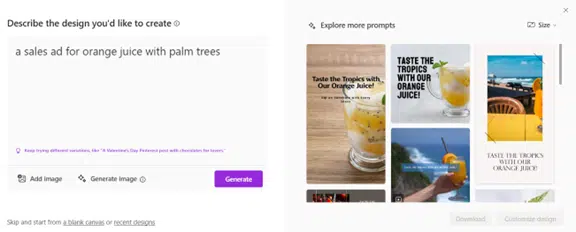
Although certain images may not align with your objectives, the tool presents a wealth of pertinent options. Should your initial attempt yield unsatisfactory results, consider rephrasing your prompt. For those in search of a user-friendly design solution, Microsoft Designer merits investigation. Regardless of whether you’re an experienced designer or a novice, it has the potential to economise both your time and financial resources.
Learn More About Our Microsoft 365 Support
Within Microsoft 365 lies an expansive realm of applications, capable of reducing expenses and amplifying productivity. From the comprehensive Office suite to the efficacy of Intune for endpoint management, it constitutes a valuable resource.
In need of assistance with queries related to Microsoft 365? Searching for guidance on setup and security? Count on us to provide aid. Reach out to us today to arrange a conversation concerning our Microsoft support services.